
At BlueJeans, we are at the forefront of providing video conferencing solutions for workplaces and remote settings.


Remote Learning
Blue
Meeting
Atomic
Design System
Corporate Training and Remote Learning
As the Design Lead for the Remote Learning Product, I have played a vital role in delivering intuitive features that empower online instructors and enhance user experiences. Our Remote Learning Product has been adopted by prestigious clients like Verizon Training, the University of Michigan, Wharton of Pennsylvania, and many others, validating the impact of our product on the education industry.
BlueJeans Hero Product
-
Led the Product Preference Redesign Project: I conducted in-depth market research and user interviews, revamping the information architecture and product requirements. By bringing the design to life, I increased the preference feature usage by 12% and reduced task completion time by an impressive 85%.
-
Led the Computer Vision Innovation Project: I took charge of discovering new product features and creating Proof of Concepts (POCs) for early discussions. My proposals for new features were well-received by key stakeholders, and I further developed detailed product requirements and user cases.
-
Handling Time-Sensitive Client (Meta) Requests: I responded promptly to a time-sensitive request from our most important client, delivering a design that not only met their expectations but also aligned seamlessly with BlueJeans' brand guidelines.
Establishing an Atomic Design System
I took the lead in creating a comprehensive Atomic Design System in Figma, comprising over 900 responsive components. This design system has revolutionized our design and engineering processes, ensuring consistency and cohesiveness across all digital touchpoints. The speed and efficiency it brings to our team are remarkable, with the fastest record of designing a new page being just 29 seconds, and the system accelerating new feature development by 85%.
BlueJeans
Remote Learning
Unlock the full potential of your virtual classroom with an immersive and interactive video conferencing experience. Our remote learning features unite students, content, and teaching resources in a seamless, single view, creating an exceptionally effective and enriching virtual learning environment.

"After experimenting with different solutions, BlueJeans was by far superior to other tools."
Todd Austin, Videoconferencing Lead,
College of Literature, Science & the Arts, University of Michigan
"On a daily basis, BlueJeans affects our culture. It lets us incorporate the world into our classroom. That’s the direction we’re moving as a global business school."
Dan Alig, CIO
Wharton School & UPenn
“If we were to look at another product...I have a hard time believing their customer support could do the things BlueJeans does. To me, that puts BlueJeans above the rest.”
Steve Engorn, Former CIO, Stevenson University
Comprehensive
Teacher Dashboard
Simplify virtual teaching with an intuitive interface, consolidating essential classroom management and engagement tools in one place.
World-Class
Audio & Video
Experience crystal-clear HD video and unrivaled audio quality with Dolby Voice®, enhancing the natural conversation experience.
Flexible Learning
Empower students and teachers with optimized schedules, attending virtual sessions, office hours, and mentoring from anywhere.
Effortless Scheduling
Easily schedule video lectures through your calendar or browser, ensuring instant connectivity from any device.
Customizable Classroom Layouts
Tailor your virtual learning environment with personalized layouts for efficient classroom management.
Enhanced Study Groups
Foster seamless collaboration among students, enabling effective group projects, test preparation, and easy access to online coursework.
Engaging Collaboration Board
Elevate student participation through collaborative co-creation on the interactive digital whiteboard, fostering active classroom engagement.
Smart Meetings &
Note-Taking
Empower students with BlueJeans Smart Meetings, allowing them to tag highlights, crowdsource notes, and utilize recordings as valuable study resources.
Streamlined Departmental Collaboration
Simplify administrative meetings with a productivity-focused video conferencing platform, enhancing virtual engagement.
Dynamic Breakout Sessions
Encourage in-depth exploration of topics with seamless small group discussions in random or designated breakout rooms.
Innovative Teaching Opportunities
Embrace new teaching methods through collaboration with professors from different schools and inviting subject matter experts, enriching class experiences.
Maximized Student Engagement
Unlock the full potential of remote learning with an immersive and interactive video conferencing experience, tailored to enhance student participation and learning outcomes.
User Testing
Amidst the pandemic, in-person interviews were not feasible, leading to the utilization of online platforms like usabilityhub and usertesting.com for user testing. Extensive A/B testing and heat map testing were conducted to refine the product design and development. Additionally, event tracking on Mixpanel provided valuable insights.

To gain expert perspectives, six virtual expert interviews were conducted, where the Remote Learning dashboard was demonstrated and tested. The interviewees taught across various educational levels, ranging from 3rd grade to college, with class sizes spanning from 4 to 55 students. Familiarity with Zoom, Google Meet, and other virtual conferencing platforms was common among the experts.
The objective of this testing was to conduct a cognitive walkthrough with the experts, ensuring that the product offers essential features and addresses their real challenges. The outcomes of these experiments hold significant value, guiding the refinement and enhancement of the product design and development process.
01
Customization is Key
Users value the ability to customize their virtual classroom setup according to their unique teaching needs. Different teachers prioritize various tools and features, such as teaching apps or the roster, and having the flexibility to arrange these elements side by side is crucial.
02
Optimizing for Limited Devices
Recognizing that many users rely on a single device, ensuring efficient multitasking and providing ample space to access documents from their desktop is essential.
03
Balancing Teaching and Class Management
As most teachers handle virtual classes without a TA, it's vital to design the dashboard to facilitate both teaching and managing the class simultaneously.
04
Importance of Waiting Room
A waiting room feature is highly valued by teachers to manage class entry effectively and maintain classroom security.
05
Effective Hard-Mute Functionality
A hard-mute option is crucial as some students may not be aware of their background noise, ensuring a distraction-free learning environment.
06
Clear Identification of Speakers
Users desire the ability to quickly identify the speaker among all students during virtual class discussions.
07
Promoting Engagement
Enhancing student engagement is a top priority. Teachers emphasize the challenge of replicating the interaction and connection of in-person teaching, and the platform should encourage active participation.
08
Flexible Roster Management
Roster functionality is vital for attendance and roll calls. Teachers have different preferences for how students are ranked, whether by last name or first name.
09
Effective Messaging System
A clear and intuitive messaging system is crucial for communication with students, ensuring clarity in group messages versus direct messages. Additionally, the ability to export chat history is desired for security reasons.
10
Visible Student Gallery
Prioritizing students' visibility is crucial, as teachers want to see all students simultaneously during virtual classes.
11
User-Friendly & Intuitive Interface
Keeping the platform simple and fast is essential, as teachers have limited time during classes and need an easy-to-use interface.
12
Exporting Class Reports
Offering the option to export class data as reports for attendance, performance, and other purposes is highly valued by users.
FTU EX


Remote Learning Enter-Exit Flow


Video Layout
I aim to provide a customizable and flexible virtual classroom experience within our main product, BlueJeans meeting. The challenge lies in technical restrictions due to the backend infrastructure, but I am determined to overcome these hurdles for an exceptional user experience.

Customizable Layout
My goal is to offer a comprehensive classroom view with all the necessary tools for seamless session management. Despite the fixed dashboard size and breakpoint, I have extensively explored solutions and calculations to find the best ratio for each panel, ensuring customization possibilities.
Flexible Views
I understand the importance of personal preferences in viewing the class. Whether it's gallery view or a tailored arrangement, I enable users to sort the video layout based on participation level, alphabetical order, or prioritizing raised hands. Working closely with the backend team, I navigated the strict logic for each layout, optimizing the space within the "classroom" while accounting for various use cases and user stories.


Screen Share
This project presents significant challenges in implementing screen share functionality due to technical limitations. In addition to addressing the 27 distinct dashboard configurations, I am also tasked with devising a solution for the screen share view, which must adapt to 12 different dashboard layouts.


Weather Person Mode
Furthermore, I have taken the lead in developing the 'weather person mode' feature. This innovative functionality enables users to overlay their videos without background onto their presentations, fostering enhanced class engagement and interaction.


Panels
Designing the video layout was a challenge, especially when trying to fit everything from the original design into the new panels. Many modules were non-responsive, requiring me to devise creative solutions to ensure all teaching apps perfectly fit within the panels.

People Panel & Reactions
I take pride in knowing my audience. I ensure smooth class management by keeping track of session attendees and those in the waiting room.
I personally led the development of roster reactions, which was a highly requested feature from our users. Now, during classes, students can express themselves using reactions, eliminating interruptions and enhancing the learning experience.
Chat Panel
Stay seamlessly connected with my new chat panel. Never miss a beat while multitasking – You can continue messaging while sharing content, whiteboarding, or annotating.

Teaching Apps Panel
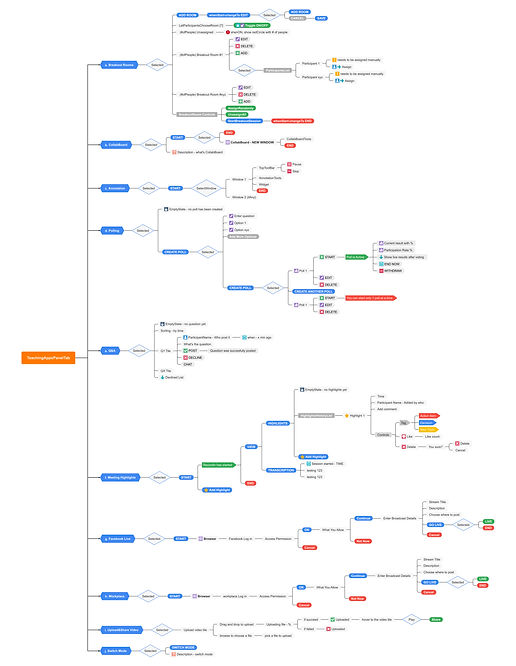
I empower myself with quick access to essential teaching applications, including Collab Board, Breakout Sessions, Polling/Q&A, and Smart Meeting highlights. This way, I elevate the effectiveness of my remote learning sessions.

BlueJeans Meetings

Revolutionary Structure: Our new Preference structure is the result of extensive competitor research and testing.
-
Faster Task Accomplishment: A better structure not only speeds up task completion but also enhances the discoverability of our features.
-
Impressive Efficiency Boost: With the new design, simple tasks like "find virtual background," "add name tag," "choose a different device," and "link to a new calendar" can be accomplished 40% faster!

-
Edit Profile In-App: Users can now edit their profiles directly within the app, eliminating the need for switching between a web browser and the app.
-
immersive Experience: Enjoy a more engaging and immersive experience with the new design.
-
Incredible Speed Enhancement: Tasks like "changing profile picture" are accomplished a whopping 85% faster!

-
Enhanced Background & Effect: We have made improvements to the Background & Effect section for better navigation, viewing, testing, and fun!
-
Comprehensive Video Testing: Users can now test all video-related features together in one place.


-
Customizable Name Tags: Users can select any color they like for their name tags and save their preferences. Preview it with virtual backgrounds and other effects!
-
Simplified Features: We have simplified feature names for easier user understanding, and provided more tooltips and guidance.

POC - Smart Theme
Introducing Smart Theme: Elevate Your Virtual Background Experience with AI-Generated Preset Styles
Step into the future of virtual meetings with our groundbreaking project, Smart Theme.
Say goodbye to the hassle of finding the perfect backdrop for your virtual meetings. Smart Theme harnesses the power of advanced artificial intelligence to generate stunning virtual backgrounds that perfectly match your surroundings and enhance your professional image. With a wide array of preset styles to choose from, you can effortlessly select the ideal backdrop that complements your unique style and presentation.

Schedule Meetings
in App
Elevate your meeting scheduling experience with our immersive desktop app feature. Seamlessly plan and coordinate meetings within the app, while effortlessly syncing with your preferred calendar. Say goodbye to scheduling hassles and hello to streamlined efficiency, all within a single, user-friendly interface.

Blue Design System
Atomic Design System
We have established our Atomic design system encompassing styles, usable UI patterns, and ready-to-implement pages.
This design system brings consistency to our branding, increasing efficiency, productivity, and facilitating scalability for seamless product expansion and evolution.

Design system implementation has yielded significant benefits, including
-
30% reduction in design time
-
5x increase in creating prototypes
-
Decreased engineering iterations
-
Increased profitable revenue, high NPS scores, and a strong focus on customer satisfaction
-
Writing UI code is now three times faster on average
-
with the best result being seven times faster
-
Led to a 70% reduction in UI bugs, enhancing overall product quality

